Challenge Rules

Monday, May 27, 2013

Challenge #17: 4th of July

Happy Memorial Day to our friends in the US.  Perfect timing for all things red, white and blue!  Just use a SVG (or similar) file to create your patriotic project.  We are so happy you've joined us and can't wait to see what you've created.  And please note that this will be the last challenge until fall.  But stay tuned to this blog for announcements, projects and other tidbits to tide you over until then!

4th OF JULY

Prize for this challenge is a $5 Gift Certificate for SVG files
from the Creative Pointe's ON LINE STORE.
You'll find over 100 SVG files/sets available for all your paper crafting projects.
Winner will be randomly chosen from all submissions.

One extra special entry will receive the"Creative Choice" button.


Ready for some inspiration? Let's take a look at what the Design Team created using SVG diecuts. For detailed information and/or instructions, please click on their blog link.

Carolyn from GRANNY MA's CREATIVE BLOG created the above card using the heading from the PATRIOTIC SET.  She says:  "I decided to create a pop up card.  Remembering what I had watched on a Sandi Genovese video I decided to apply this to a card.  First, I basket weaved red and white strips and the way it came out was like the stripes on the Flag.  I glued the weaved square to a blue card stock to give it the 4th of July colors.  Placed "Celebrating the 4th" on the front of the weaved section along with more stars and a firecracker. 


Inside of the card, I cut out the two sets of stars that came with the set and attached one star to the pop out tab, and the other set to each side along with extra yellow stars.  Layered blue, red and white cards and placed on the bottom of inside for a message or signing.  Placed another firecracker on one edge and a yellow star on opposite.  Happy Summer every one...and see you next September."

Victoria from PAPER SQUIRREL  used the pinwheel star from The Creative Pointe's PATRIOTIC SET to create this festive banner.  She says:  "The best part of this project is that it's super quick since you're working with multiples of the same cut.  Some gingham ribbon and buttons dress things up a bit.  Visit my blog for all the details!"


Shelissa from SHELISSA'S CRAFT STUDIO used the flags from the PATRIOTIC SET to make her project.  She says:  "Creating this last project for this term I wanted to do something different. We just had a diversity food festival at my job and I created different flags and connected them with fishing wire. This was my inspiration for this project. I created miniature flags and connected them with fishing wire. Really simple project but I really like that you can create these flags of different countries and string them together."

Octavia from T's CORNER FOR SCRAPPIN' made a set of Artists Trading Cards from the PATRIOTIC SET.  She says:  "From the Patriotic Set I used The Statue  of Liberty to make ATC's.  The paper from an old Paris Hilton pack was perfect!  I glittered, embossed and blinged."


Cindy from THE CREATIVE POINTE created a picture using the LIBERTY BELL SVG.  She says:  "I started out with really bright paper but toned it down by distressing and using gold Perfect Pearls.  To get all the details, please click over to my blog".

Tina from TINA'S SCRAP CORNER  made this 2-page scrapbook layout using a few files from the PATRIOTIC SET set. She says:  "I created the layout from a sketch, I used the heading, the flag banner as a tip for the arrow and a couple of stars from the set.  This isn’t your typical 4th of July layout, but the cuts from the Patriotic set gives a 4th of July feel to the layout. To get all the details of the layout you’ll have stop by my blog."


Challenge #16: Winner

We received four great Father's Day cards for this challenge.  Please click on the creator's links for a closer look.  Thanks to those who entered and be sure to click on the "HOME" button for details on the current Challenge, which will always be the top post.
Challenge #16: FATHER'S DAY CARDS
randomly drawn winner of the $5 SVG Gift Certificate
is  


Congratulations!
Please email Cindy at creative@avci.net to claim your Gift Certificate.

This Challenge's "Creative Choice" is 
 4. Beth F
The choice of paper, embellishments and cut elements all came together perfectly.  
Great job once again Beth!


Monday, May 13, 2013

Challenge #16: Father's Day Cards

Dear old Dad...what fun we have creating a special card for you using SVG (or similar) files!  Show us what you'll be sending this year to that special man.  We are so happy you've joined us and can't wait to see what you've created. 
FATHER'S DAY CARDS

Prize for this challenge is a $5 Gift Certificate for SVG files
from the Creative Pointe's ON LINE STORE.
You'll find over 100 SVG files/sets available for all your paper crafting projects.
Winner will be randomly chosen from all submissions.

One extra special entry will receive the"Creative Choice" button.


Ready for some inspiration? Let's take a look at what the Design Team created using SVG diecuts. For detailed information and/or instructions, please click on their blog link.

Carolyn from GRANNY MA's CREATIVE BLOG  used the NUMBER ONE DAD file to create a shaped card.  She says:  "I used Kraft type cardstock for the base of the card.  I created a shaped card by laying the shadowed piece of the image on the edge of the card, and joined together creating a card base.  The card is created from a plaid design I found on My Memories Suite scrapbook software, exported to my file, and then printed giving me the plaid look of a shirt.  For the inside of the card, which is white, I cut a piece of kraft cardstock to about 3 inches and glued to the inside...contrasting the colors.  I wanted a tie created out of design paper and had a pad of these small to medium size paper.  Decided on the black polka dot for the tie, and layered on to a shadow of the SVG cut.  Put it all together and presto...a Father's Day card for my son over-seas."

Cindy from THE CREATIVE POINTE created this shaped card using the new DAD IS KING CARD.  She says:  "This card combines three of my favorite things to create with:  scrap pieces of decorative paper, Distress Inks and bling!  Click over to my blog for the details."

Victoria from PAPER SQUIRREL also used the NUMBER ONE DAD file on the front of her card.  She says:  "June and summer fun will be here before you know it, so join in our two-week “Father's Day” themed challenge and get a jump start on a card for dad's special day!  I paired washi tape with The Creative Pointe's "Number One Dad" SVG file to create a quick and quirky card for my dad."

Tina from TINA'S SCRAP CORNER made this card using a file from the CAR SET.  She says:  "I created a card with a classic car from the Car Set collection. This set has five cool cars in it that are great for anything masculine. To get all the details of the card you’ll have stop by my blog."

Shelissa from SHELISSA'S CRAFT STUDIO  shows her take on the NUMBER ONE DAD file, having the lettering extend off the edges of the card.  She says:  "For this Father's Day card I used the Number One Dad cut file from The Creative Pointe website. I cut it out using DCWV metallic dark blue and light blue cardstock.  For the base card I used a grey card stock that I picked up from Michaels."

Octavia from T's CORNER FOR SCRAPPIN' used the versatile TROPHY CARD to make this sparkling card.  She says:  "Using the Trophy file, my favorite gold glitter paper, and black and white cardstock, this Father's Day card is for the #1 Dad!"


Challenge #15: Winner


How disappointing to only get one entry...even though it was a good one.  Please click on the Beth's link for a closer look.  Hopefully the next Challenge will appeal to more people.  Click on the "HOME" button for details on the current Challenge, which will always be the top post.

Challenge #15: WEDDINGS
Wnner of the $5 SVG Gift Certificate
is  
#1  Beth F
Congratulations!
Please email Cindy at creative@avci.net to claim your Gift Certificate.

Monday, April 29, 2013

Challenge #15: Weddings

Ahhh...weddings!  One of our own DT members is planning hers for June.  You'll be able to guess who when you look at the projects below.  Now we'd like to see your SVG (or similar) file created wedding related projects!  We are so happy you've joined us and can't wait to see what you've created. 
WEDDING

Prize for this challenge is a $5 Gift Certificate for SVG files
from the Creative Pointe's ON LINE STORE.
You'll find over 100 SVG files/sets available for all your paper crafting projects.
Winner will be randomly chosen from all submissions.

One extra special entry will receive the"Creative Choice" button.


Ready for some inspiration? Let's take a look at what the Design Team created using SVG diecuts. For detailed information and/or instructions, please click on their blog link.

Victoria from PAPER SQUIRREL created this scrapbook layout and says:  "What perfect timing!  Our two-week "Weddings" theme gave me another opportunity to finish up some projects for my own wedding day that is fast approaching.  (Yikes!)  I decided to take a step back and document our engagement story with this scrapbook layout.  The diamond ring SVG from The Creative Pointe's "Wedding Set" made a perfect frame for our photo.  I'm sure I'll be using this set again in the near future!"

Pam from MZLAVR2's CREATIONS also used a file from the "Wedding Set" and made this cute card.  She added flowers and a "Love Birds" sentiment.

Carolyn from GRANNY MA's CREATIVE BLOG will be presenting this card to her granddaughter when she gets married this summer.  She says:  "To create this card I used the "Wedding Cake Card" cut file from Creative Pointe and a file from the silhouetteonlinestore.com by Lori Whitlock.  I used cream color card stock for the card base.  The silvery, glittery paper on the cake is from Michaels, as is the gray polka dot background paper used for the layering.  The silhouette wedding couple are ones I created using my SCAL3 software, and will be available in my store. Small flowers are from the ribbon section of the sewing department of Wal-Mart.  The pearls on each end of the card came from the $1.00 section at Michaels."

Cindy from THE CREATIVE POINTE used the car file from the "Wedding Set" and says:  "I matched the colors on the card to the wedding colors but this card will be going to the groom-to-be!  For the details and the reason WHY the groom is getting this card, please click over to my blog."

Tina from TINA'S SCRAP CORNER made this gorgeous card using the cake file from the "Wedding Set".  She says:  "Lots of elements in this SVG collection to make many cards with. To get all the details of this card you’ll have stop by my blog."

Octavia from T's CORNER FOR SCRAPPIN' used the "Church" SVG to create this lovely card.  She says:  "I enjoyed doing this project!  I don't think you could say "congratulations" any better than with the blessings of the church cut.  I also used the beehive embossing folder for the brick effect. I used pattern paper, layered vellum over it to give it that stained glass look. And resized and layered the windows for the frames."

Shelissa from SHELISSA'S CRAFT STUDIO used the "Wedding Set" to make this beautiful bag.  She says:  "I wanted to make a fun favor bag that any bride would be proud of.  I think I am going to make a couple more of these."

Now it's your turn to get your Wedding on!  Just create any wedding or bridal themed item using a SVG (or similar) file with your electronic cutter and link it up. 


Challenge #14: Winner


We received six great Mother's Day cards for this challenge.  Please click on the creator's links for a closer look.  Thanks to those who entered and be sure to click on the "HOME" button for details on the current Challenge, which will always be the top post.
Challenge #14: MOTHER'S DAY CARDS
randomly drawn winner of the $5 SVG Gift Certificate
is  
#5  Beth F
Congratulations!
Please email Cindy at creative@avci.net to claim your Gift Certificate.

This Challenge's "Creative Choice" is the "Mom" shaped cards created by
Darlene used a Silhouette file to create these and really made them special with the lovely papers and embellishments she chose.  Congrats Darlene!  Be sure to grab your badge from above.

Monday, April 15, 2013

Challenge #14: Mother's Day Cards

We want to see the lovely SVG (or similar) file created cards you've made for that very special person--MOM!  We are so happy you've joined us and can't wait to see what you've created.

MOTHER'S DAY CARDS

Prize for this challenge is a $5 Gift Certificate for SVG files
from the Creative Pointe's ON LINE STORE.
You'll find over 100 SVG files/sets available for all your paper crafting projects.
Winner will be randomly chosen from all submissions.

One extra special entry will receive the"Creative Choice" button.


Ready for some inspiration? Let's take a look at what the Design Team created using SVG diecuts. For detailed information and/or instructions, please click on their blog link.

Victoria from PAPER SQUIRREL created this sunny card using the MOM FLOWERS  file.  She says:  "That special day to say “thank you” to mom for everything she’s done for us is not too far away, so get out those electronic cutters and join the "Mother's Day Cards" challenge!   For my own mom, I wanted a bright and cheerful card…with flowers…my mom LOVES flowers!   The basic layout is very simple, with the star being the potted posy cut from My Mind’s Eye patterned papers using The Creative Pointe’s “MOM Flowers SVG."

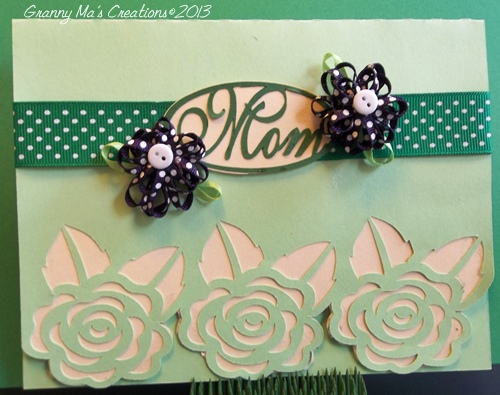
Carolyn from GRANNY MA's CREATIVE BLOG created the lovely card above as well as the two beauties below using the brand new MOM CARD & CHARMS set.  She says:  "I first cut out the card base from a svg file from The Creative Pointe with "Mom" cut out in approximately the center.  Than using Versamark and a Stampin! Up stamp, Fifth Avenue Floral (believe it's retired stamp set) I placed the watermark image right below Mom and embossed with white embossing powder.  Use a ribbon and two flowers for embellishing the card.  For backing of the "Mom" cut out, I placed an off-white piece of cardstock behind the opening.  The next two (2) cards used a card base from Birds Cards (Rose Edge Card) which features a stenciled edge of roses.  The card can be used with the rose edge to the side or as I have done, along the bottom."
 
"I cut out the "Mom" charm and the back shadow and placed over a ribbon above the cutouts of the stenciled roses.  I placed small flowers at each end of the charm and added punched butterflies for embellishments."
"I hand trimmed the backing for the blue card, and then for the green card, I joined the pieces to come up with a 'welded' look and cut out with my machine.  And then trimmed it off at the perforated line.  Easy-peasy...."

Pam from MZLAVR2's CREATIONS created this colorful card using the MOM FLOWERS file.  Lots of lovely texture on this card!

Shelissa from SHELISSA'S CRAFT STUDIO

Tina from TINA'S SCRAP CORNER created her card with a flower from the FLOWER SET ONE collection.  To get all the details of the card you’ll have to hop over to Tina’s blog.


Cindy from THE CREATIVE POINTE also used the MOM CARD & CHARMS set to create this Mother's Day card.  She says:  "Click over to my blog for the design details and the quick and easy ribbon technique I used."