Challenge Rules

Monday, April 28, 2014

Challenge #33: Mother's Day Cards


MOTHER'S DAY CARDS

If we receive at least 15 entries, the prize for this challenge will be a $5 Gift Certificate for SVG files from the Creative Pointe's ON LINE STORE.
You'll find over 150 SVG files/sets available for all your paper crafting projects.
If we have less than 15 entries, the winner will receive this SVG set  MOTHER'S DAY HEADING.  Winner will be randomly chosen from all submissions.

One extra special entry will receive the "Creative Choice" button.

Ready for some inspiration? Let's take a look at what the Design Team created using SVG diecuts.


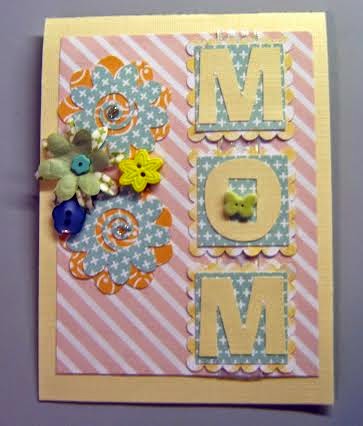
Shelissa created a pretty pink card with floral accents using the MOM Flowers file.  She says:  "This challenge is to celebrate the most important person of all “MOTHERS”.   Those  women that have given birth to us and have put up with all of our issues."  Get all of the card details on Shelissa's blog:  Shelissa"s Craft Studio

Carolyn created this bright and cheerful card using the MOM Card and Charms card base.  She also decorated the inside so be sure and check out her blog to see the complete card:  Granny Ma's Creative Blog

Cindy created a shabby chic card for Mom using the Stenciled Rose Card Front file.  She says:  "This card is much more shabby than I intended...due to an ink accident.  But I really liked how it turned out, so I guess it was a 'happy accident'!"  Get all the details on Cindy's blog:  The Creative Pointe

Ruth used two files to create this cute and clever free standing pop-up card.  She says:  "I love interactive cards! I just think it's a fun way to surprise someone a little when they open up a card. There are lots of fun designs right now and I thought the free standing pop-up card would be a great one for the World's Best Mom file! What better way to celebrate the World's Best Mom than with a card that will open up and stay open to show the world who the best mom is! I used a flower from the Flower Set One to add a little extra decoration without adding a lot of bulk. Come and check it out and create something for that special mom in your life for the Creative Cutting Challenge!"  Ruth's blog:  Paper and Musings

Heather created this vintage style tag card using leaves from the Leaves & Branch set.  So versatile, these leaves are the perfect accent for this piece.  To get all the lovely details, check out Heather's blog:  My Artistic Adventures

Carmen created this "Tea-Riffic" shaped card using the ever popular Tea Cup Card.  Head over to her blog to see more:  Carmen's Creations

Octavia created this cheerful card that features the daisy file from Flower Set One.  She says:  "Cutting the layers with orange pattern paper and the top layer in white.  With this cut I only added leaves and a banner - so easy!  On the inside I put another flower and printed my sentiment."  See the inside and get all the details at Octavia's blog:  T's Corner For Scrappin'

Tina created this lovely card for Mom using a file from  Flower Set One.  She says:  "I used one of the flowers from the set for the base of the flower cluster. MOM was cut with various Silhouette files. A cute little card that I think Mom would appreciate and takes no time at all to put together. For more details you have to head over to my blog":  Tina's Scrap Corner

PLEASE READ BEFORE YOU ENTER THE CHALLENGE:
Please make sure that you follow our very simple rules to enter this challenge.  
(1)You MUST use a SVG or similar electronic cutting file in your project.  CRICUT CARTRIDGE ONLY ENTRIES ARE NOT ELIGIBLE.  Please make sure that you mention somewhere in your post what part of your project was created with a cutting file.  Entries that do not fit this basic requirement will be deleted.
(2)  NO BACKLINKING.  This has always been our rule but we've noticed that it has not been followed lately. Going forward, projects posted before the start of this challenge will be deleted.


Challenge #32: Winner

We received 20 fabulous entries for this challenge and if I would have loaded the link up correctly, they would have shown up on the blog post!   Thanks to everyone who played along.  Please click on the link up link to see all the entries.  Click on the "HOME" button for details on the current Challenge, which will always be the top post.
Challenge #32 SPRING randomly drawn winner of the $5 SVG Gift Certificate

This winner is
#15 Beth F.

Congratulations!
Please email Cindy at creative@avci.net to claim your Gift Certificate.

Now on to the hardest part...making the "Creative Choice" selection....
The entry chosen is:
This stunning dimensional hot air balloon.  Love the lacy accents and the flowers used by
Please grab your badge above and display it proudly.


Monday, April 14, 2014

Challenge #32: Spring


SPRING

If we receive at least 15 entries, the prize for this challenge will be a $5 Gift Certificate for SVG files from the Creative Pointe's ON LINE STORE.
You'll find over 150 SVG files/sets available for all your paper crafting projects.
If we have less than 15 entries, the winner will receive this SVG set: LEAVES & BRANCH.  Winner will be randomly chosen from all submissions.

One extra special entry will receive the "Creative Choice" button.

Ready for some inspiration? Let's take a look at what the Design Team created using SVG diecuts.


Heather created a gorgeous vintage style Easter card using the Rolled Roses and Fancy Flourishes-One files.  Check out her blog for all the details:  My Artistic Adventures

Carolyn created a scrapbook layout using the Race Car with Numbers because she said spring brings in NASCAR and other auto racing.  She also says:  "And the Race Is On title is from the SilhouetteAmerica online store; the race track I created from a image located on the Internet; and the borders and flags from a SVG file (from where I can't remember right now).  I also created the border for the photo mat and placed the flag in the one corner.  I used Numbers 1 as the lead car, and 2 & 4 for my great-grandchildren's ages."  For more, check out Carolyn's blog:  Granny Ma's Creative Blog

Carmen created a lovely slider card that features the butterfly from the  Garden Friends 1 set.  See more at her blog:  Carmen's Creations

C
Ruth used the sign from the Flower Set One to create this gorgeous spring layout.  She says:  "This is my favorite time of the year! When the world comes alive with bulbs sending flowers up through the long frozen ground! Come celebrate spring with the Creative Cutting Challenge! However you like to celebrate spring, we'd love to see your creations! My layout celebrates those first spring bulbs blooming in my yard finally after our long, harsh winter. Cindy's Flower Set 1 flower sign really was a sign for spring! Spend a little time creating and get out and enjoy the Spring!"  More at Ruth's blog:  Paper and Musings

 Cindy created a gift bag perfect for all the Showers that happen during spring using the Watering Can, Leaves & Branch and Flower Set One files.  She says:  "Last spring I was planning a wedding shower for my sister.  This May it's a baby shower!  This gift bag would be perfect for either a bridal shower or a shower gift just for the Mom-To-Be...especially because all the gifts are usually  for baby!  If you'd like the 'Shower Heading' file, click over to my blog to grab it free!"  See more at Cindy's blog:  The Creative Pointe

Tina changed up a file to create this lovely layout.  She says:  "It’s Spring layout was created with The Creative Pointe’s Mom Flowers cut file, I eliminated the letters that spelled 'Mom' and cut out letters to spell out 'Spring' on the flowers. Spring is our favorite time of the year. I went with a grid style layout and the cut file is a real fun file to use this time of the year."  See more at Tina's blog:  Tina's Scrap Corner

PLEASE READ BEFORE YOU ENTER THE CHALLENGE:
Please make sure that you follow our very simple rules to enter this challenge.  
(1)You MUST use a SVG or similar electronic cutting file in your project.  CRICUT CARTRIDGE ONLY ENTRIES ARE NOT ELIGIBLE.  Please make sure that you mention somewhere in your post what part of your project was created with a cutting file.  Entries that do not fit this basic requirement will be deleted.
(2)  NO BACKLINKING.  This has always been our rule but we've noticed that it has not been followed lately. Going forward, backlinked projects will be deleted.


An InLinkz Link-up

Challenge #31: Winner

We received 13 fabulous entries for this challenge.  Unfortunately we had to delete two entries that clearly did not use SVG (or similiar) cutting files in their project.  I sure hate doing that...PLEASE be sure to follow our most basic rule.  However, thanks to everyone who played along according to the rules.  Please click on all the creator's links for a closer look.  Click on the "HOME" button for details on the current Challenge, which will always be the top post.
Challenge #31:  EASTER
as we did not have 15 entries, the randomly drawn winner will receive  this SVG set 
  from THE CREATIVE POINTE.  
This winner is
#8 Happy Easter

Congratulations!
Please email Cindy at creative@avci.net to claim your file.

Now onto the "Creative Choice" selection....

I love how cute and simple this project is...it would be perfect to place in all the kiddie's Easter baskets.  
The entry chosen is:
Please grab your badge above and display it proudly.


Monday, March 31, 2014

Challenge #31: Easter


EASTER

If we receive at least 15 entries, the prize for this challenge will be a $5 Gift Certificate for SVG files from the Creative Pointe's ON LINE STORE.
You'll find over 150 SVG files/sets available for all your paper crafting projects.
If we have less than 10 entries, the winner will receive this SVG set: EASTER EGG SET. Winner will be randomly chosen from all submissions.

One extra special entry will receive the "Creative Choice" button.

Ready for some inspiration? Let's take a look at what the Design Team created using SVG diecuts.


Carolyn got down to work and came up with this amazing card in a box.  She says:  "Card in a Box has been the craze on Facebook for the past couple weeks; and I thought, hmmm I shall give this a try.  I basically used the box cutfile template and added the Easter files from The Creative Pointe (Easter Egg Set and Easter Bunny Set) for decorating."  Be sure to head over to Carolyn's blog.  She has a link to a video tutorial, a template with instructions AND a FREE cut file in SVG and Studio.  You'll have everything you need to make your own Card in a Box!  Get it all here:  Granny Ma's Creative Blog

Heather created this lovely piece of art using a file you might think is only for Christmas-- Angels.  She says that it was "an experiment" but isn't that what most art is?  See more at Heather's blog:  My Artistic Adventures

Ruth once again worked her scrapbook magic and came up with this "Eggs-ellent" layout!  She says:  "Although it's not for a few weeks it's time to start thinking about Easter! I created my very first Easter layout using a file from The Creative Pointe's Easter Headings. I thought it'd be fun to dye my papers, just like the eggs. Feel free to stop by my blog to hear all about my page and I sure hope you'll play along with the Easter Creative Cutting Challenge!"  Ruth's blog:  Paper and Musings

Octavia created this heavenly card using the Easter Headings set.   She says:  "I cut the top layer in yellow and the base in pink. I made the base by copying the bottom layer and welding it to make the card. Since the top reminded me of a window, I inked up some white paper to form a cloud scene. Stamped 'Happy Easter' on the inside to finish."  See more at Octavia's blog:  T's Corner For Scrappin'

Carmen created a lovely "Welcome" sign for her daughters new apartment.  She says:  "I used The Creative Pointe’s Easter Egg Heading.  Using my Sure Cuts A lot program I took off 'Easter' and added 'Welcome'. I cut multiple lower layers so that I could have the fun different colors.  I also added clear micro glitter to the top once it was all glued together which gave it a fun shine."  To see more, please head over to: Carmen's Creations

Cindy got out the Distress markers and Stickles and jazzed up this card, created using the new Easter Bunny Card file.  She says:  "I had fun decorating the Easter eggs...the only ones I'll be doing this season!"  To see more details on the card, click over to The Creative Pointe

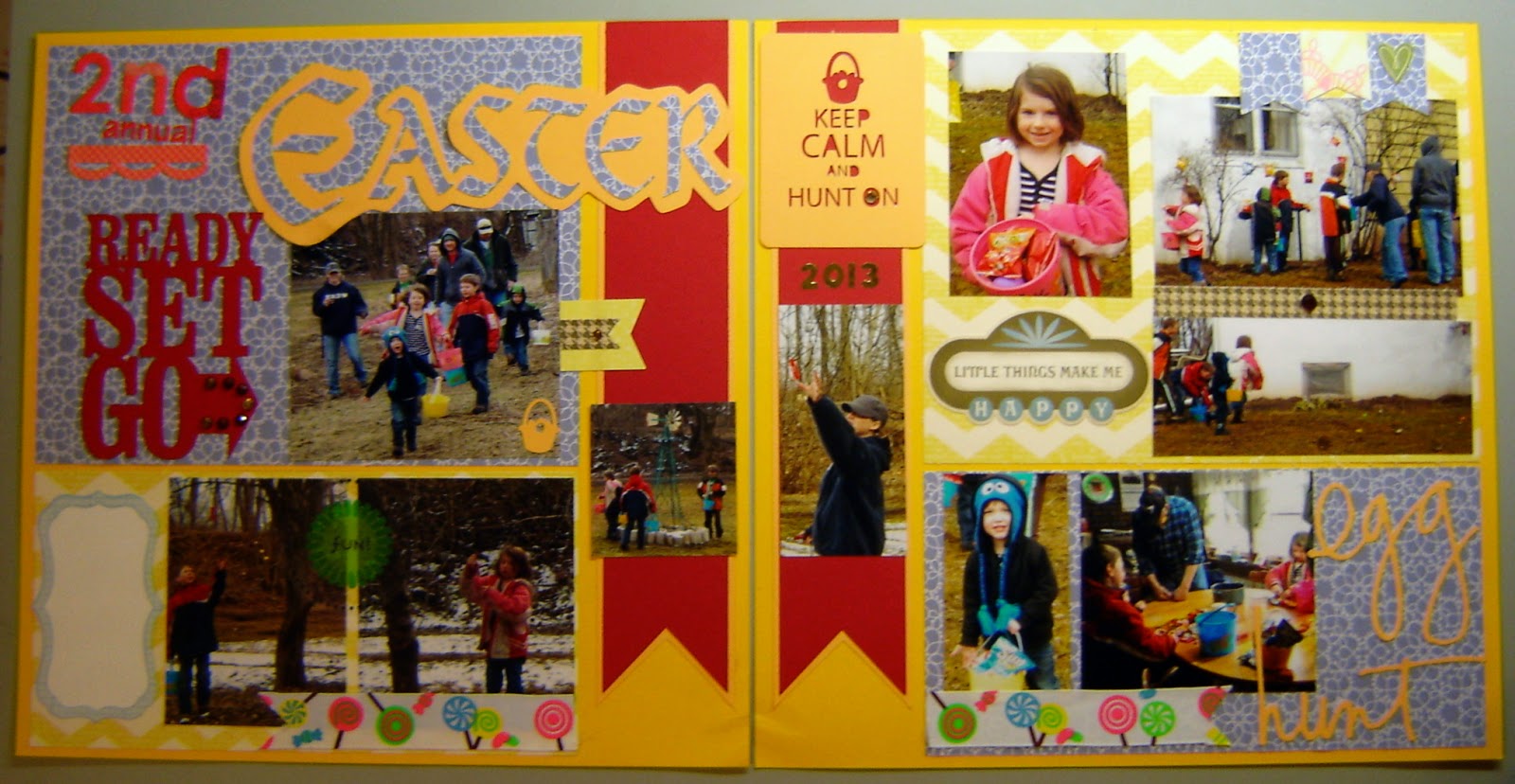
Tina created a wonderful scrapbook layout.  She says:  "I did another 2-page layout for Easter. I used The Creative Pointe’s cutting file: Easter Headings. I used the script with shadow file this year with the annual egg hunt that we put on at our place for the G-kids. This was cut with my Cameo and made a nice title for the layout. Never have any trouble cutting The Creative Pointe’s files. This set of files comes with 5 different headings and cam easily be measured down and cuts fine.  If you're looking for an overall Easter file this is a good one."  For more details and some closer shots of the layout, please visit Tina's blog:  Tina's Scrap Corner

Scrapple Tree

Now we're ready to see YOUR EASTER SVG (or similar) creations.
PLEASE READ BEFORE YOU ENTER THE CHALLENGE:
Please make sure that you follow our very simple rules to enter this challenge.  
(1)You MUST use a SVG or similar electronic cutting file in your project.  CRICUT CARTRIDGE ONLY ENTRIES ARE NOT ELIGIBLE.  Please make sure that you mention somewhere in your post what part of your project was created with a cutting file.  Entries that do not fit this basic requirement will be deleted.
(2)  NO BACKLINKING.  This has always been our rule but we've noticed that it has not been followed lately. Going forward, backlinked projects will be deleted. 

Challenge #30: Winner

We received a record 40 fabulous entries for this challenge.  Thanks to everyone who played along.  Please click on all the creator's links for a closer look.  Click on the "HOME" button for details on the current Challenge, which will always be the top post.
Challenge #30:  ANYTHING GOES randomly drawn winner of the $5 SVG Gift Certificate
This winner is

Congratulations!
Please email Cindy at creative@avci.net to claim your Gift Certificate.

Now onto the "Creative Choice" selection....

Every entry was so unique and lovely but the project chosen for this award was not only special in it's own right, it was also replicated 85 times!  Check out these lovely explosion box invitations Michelle created for a school dance.  Amazing!!
 The entry chosen is:
Please grab your badge above and display it proudly.


Monday, March 17, 2014

Challenge #30: Anything Goes


ANYTHING GOES

If we receive at least 20 entries, the prize for this challenge will be a $5 Gift Certificate for SVG files from the Creative Pointe's ON LINE STORE.
You'll find over 150 SVG files/sets available for all your paper crafting projects.
If we have less than 20 entries, the winner will receive this SVG set: CARDINALS  Winner will be randomly chosen from all submissions.

One extra special entry will receive the "Creative Choice" button.

Ready for some inspiration? Let's take a look at what the Design Team created using SVG diecuts.

Carolyn was thinking of sunnier days when she created this spring-themed layout using files from Flower Set One.  She says:  "I created a layout of my granddaughters planting flowers just outside the garage door when they were visiting here in 2012, and less than 30 days they will be helping me to plant flowers in the same area."  Get all the details on this darling page at Carolyn's blog:  Granny Ma's Creative Blog

Carmen took the Race Car with Numbers file and made it her own, turning it into two Super hero cards!  She says:  "Last week was my twin 4 year old nephews' birthday. This year’s theme was super heroes. So I made them superhero car cards. It was easy peasy with Sure Cuts Alot.  I used The Creative Pointe’s Race Car with Numbers and mirrored and then merged the two images to make the card.  Then I brought in the super hero logos with the trace feature.  Of course I used part of a bat wing for Batman's car...it wouldn't be complete without it  :)"  Get all the details at Carmen's blog:  Carmen's Creations

Ruth also created a layout, a super sweet First Grade page using three files from the School Set Two.  She says:  "I love crafting with paper and when you combine that with a love for who I'm creating for, it just can't get any better than that, or so I thought! I had the best time playing with Cindy's School Set II files! The designs are perfect for the primary school years and with all the great layers adding wonderful details it was pure joy to create with these! I sure hope you'll be inspired to create a project for the Anything Goes challenge!"  See more over at Ruth's blog:  Paper and Musings

 
Cindy got out the vinyl and made these two tumblers using her newest files, Quilter and Tennis Players.  She says:  "I wanted personal favors for a recent Girls Weekend so I created these designs to match the attendees interests.  Cutting them from outdoor vinyl and applying to dollar store tumblers was super easy...and the recipients loved them!"  For more information, check out Cindy's blog:  The Creative Pointe

 
Pam cleverly turned the purse file from Girlz--Set Two into a gift card holding card!  So cute!  Get the details over at her blog:  Scrapple Tree

Octavia took a ceramic tile and turned it into an awesome tribute to Mom using the World's Best Mom file.  She says: "I stamped a border and used paper butterflies for embellishments.  I adhered it to the tile using matte Mod Podge and to give it a little shine, I covered the cut in glossy Mod Podge."  Hop over to Octavia's blog for a closer look:  T's Corner For Scrappin'

Heather created a lovely spring project using the Purse Card file.  Check out her blog to get all the details on this beauty:  My Artistic Adventures

Tina created this lovely layout using elements from the Quilter file.  She says:  "I did a 2-page layout for Anything Goes. I used one of The Creative Pointe’s new cutting files: Quilter. Anybody that quilts or sews will love this file for documenting those moments, or even for a Mother’s Day card. The quilt block would make a sweet background. My layout is about the making of a particular quilt that I was approached by this particular club to sponsor the embroider patches that the ladies would quilt together (shame I didn’t win the quilt :) The quilt block made for nice corner spots in the layout, the sewing machine added a splash of color and the word 'quilter' was trimmed down to 'quilt' and shadowed."  For more details and some closer shots of the layout, visit Tina's blog:  Tina's Scrap Corner

Now we're ready to see YOUR  SVG (or similar) creations.
PLEASE READ BEFORE YOU ENTER THE CHALLENGE:
Please make sure that you follow our very simple rules to enter this challenge.  
(1)You MUST use a SVG or similar electronic cutting file in your project.  CRICUT CARTRIDGE ONLY ENTRIES ARE NOT ELIGIBLE.  Please make sure that you mention somewhere in your post what part of your project was created with a cutting file.  Entries that do not fit this basic requirement will be deleted.
(2)  NO BACKLINKING.  This has always been our rule but we've noticed that it has not been followed lately. Going forward, backlinked projects will be deleted.