Challenge Rules

Monday, May 26, 2014

Challenge #35: Father's Day Cards


FATHER'S DAY CARDS

If we receive at least 15 entries, the prize for this challenge will be a $5 Gift Certificate for SVG files from the Creative Pointe's ON LINE STORE.
You'll find over 140 SVG files/sets available for all your paper crafting projects.
If we have less than 10 entries, the winner will receive this SVG set: DAD JERSEY.  Winner will be randomly chosen from all submissions.

One extra special entry will receive the "Creative Choice" button.

Ready for some inspiration? Let's take a look at what the Design Team created using SVG diecuts.


Carolyn got busy and created three different cards using files from the Car Set.   She says: "I created the top card's 'Happy Father's Day' sentiment using my Silhouette Studio DE Print N Cut feature; also cut the backing out of poster board and adhered with foam tape.  Brads and a white bead used for embellishing; plus silver liquid pearls used for the dots and door handle.  On the middle car I used Silver Liquid Pearls for the vents on the front; and rubbed some Colonial shade of metallic rub-ons in different areas on car to represent rust.  Happy Father's Day is from TeenyTiny Word sentiments by Stampin Up.  Finally on the bottom card, I cut the prongs off a big brad and adhered with a glue dot; and the wheels was created with same type of brads."  See more at Carolyn's blog: Granny Ma's Creative Blog

Octavia used this shaped card file and says:  "The Dad Is King cut was super easy to use. Plus it gave me the opportunity to use bling and shiny paper.  Seeing that we are in Cardinal Country I went with the red, white and black, which gave the card great contrast.  Used silver paper for the crown and embossed hearts on the crown filler, used some red bling to finish it off."  Be sure to check out Octavia's blog:  T's Corner For Scrappin'

Ruth used lots of great metallics and texture on her "manly" card!  She says:  "I had a blast using The Creative Pointe's DAD Wrench file, some silver and denim papers and an embossing folder to create this Father's Day card that I think would be perfect for that handy dad everyone should have! I sure hope you'll play along and celebrate dad with us!"  See lots more at Ruth's blog:  Paper and Musings

Cindy created a colorful card for her dad using the cart file from the new Golf Set.  She says:  My Dad is an avid golfer so I wanted something bright and fun for his day.  I shaded and highlighted the cart with Distress Markers to give it dimension."  Check out Cindy's blog for the details:  The Creative Pointe

Heather created a cool car using lots of decorative papers and a file from the Car Set.  You'll need to hope over to her blog to get all the details:  My Artistic Adventures

Shelissa also chose to use the shaped Dad Is King card.  Such a great embossed background too!  Check out her blog for more details:   Shelissa's Craft Studio

Carmen used the Gear Frame to put together all the pieces to this great card.  She says:  "This is the perfect card for my dad as he was a mechanic for many years and he loves old cars."  See more at Carmen's blog: Carmen's Creations

Tina has a great card with a "punny" sentiment perfect for golfer dads.  She says:  "A Father's Day card in honor of my own father who loved to play golf :) I used The Creative Pointe's newest cut file, Golf Set. This is one you can't do with out if you have a family member that plays golf, everything is there that you would need and it would work for miniature golf too.  To check out the inside of the card, well you'll need to come by the blog. Happy Memorial Day :)".  Tina's blog:  Tina's Scrap Corner


Challenge #34: Winner

Unfortunately we only received one entry for this challenge (holiday time=busy time?)  However, it was fortunate for that entry who takes home the prize!  Click on the "HOME" button for details on the current Challenge, which will always be the top post.
Challenge #34:  GRADUATION
as we did not have enough entries, our only player will receive this SVG set  Graduation--Set Two   from THE CREATIVE POINTE.  
And this winner is
#1 Julie O.

Congratulations!
Please email Cindy at creative@avci.net to claim your file

I also LOVED Julie's card--great use of designer papers--so I've also chosen it as a "Creative Choice"
Please click over to her Blog for a closer look!
Congrats Julie and thanks for joining us!
Please grab your badge above and display it proudly.


Monday, May 12, 2014

Challenge #34: Graduation


GRADUATION

If we receive at least 15 entries, the prize for this challenge will be a $5 Gift Certificate for SVG files from the Creative Pointe's ON LINE STORE.
You'll find over 140 SVG files/sets available for all your paper crafting projects.
If we have less than 15 entries, the winner will receive this SVG set: GRADUATION-SET ONE.  Winner will be randomly chosen from all submissions.

One extra special entry will receive the "Creative Choice" button.

Ready for some inspiration? Let's take a look at what the Design Team created using SVG diecuts.

Carolyn created this awesome layout for her grandson using the Graduation Set Two.  She says:  "I used all pieces that were included in the file:  title, diploma and the hat.  The pennants are from SilhouetteAmerica online store; and "Grad" and "2013" I created using my Silhouette Studio DE software."  See more at Carolyn's blog:  Granny Ma's Creative Blog

Heather created this lovely vintage looking card also using elements from Graduation Set Two.  Click over to her blog to see all the yummy details:  My Artistic Adventures

Ruth created this cute and clever spinner card using the 2014 Graduation Signs file.  She says:  "I love The Creative Pointe's clever and fun signs for graduation. I had a ton of fun coming up with a fun design to show them off. It might look crazy, but a spinning image isn't that hard to create on a card. Come and check out my post and I sure hope you'll play along with the graduation challenge!"  Ruth's blog:  Paper and Musings

Cindy went with a black and white theme on her card.  She says:  " I combined the heading from  Graduation Set Two with the 2014 Graduation Day Heading to come up with this unique sentiment."  See more at Cindy's blog:  The Creative Pointe

Shelissa used the 2014 Graduate Heading at the top of her bright and bold card.  Lots of lovely texture too.  To see more, head over to her blog:  Shelissa"s Craft Studio

Tina created this lovely layout for her granddaughter using the 2014 Graduation Signs (actually she used 2012--most years are available).  She says:  "A layout created using The Creative Pointe's Graduation Signs 12 set. I loved this set as soon as I seen it and knew that I needed the route sign for the title of Britney's Graduation layout which was way past due to scrap but I got 'er done. This is a fun set to use and I added the Grads at Work sign also to the layout. We were very blessed to be invited to Brit's graduation and got seats inside to see the whole thing it was wonderful to see a grandchild graduate too."  See more of the layout at Tina's blog:  Tina's Scrap Corner


Challenge #33: Winner

We received just 7 lovely entries for this challenge.  Thanks to everyone who played along.  Please click on all the creator's links for a closer look.  Click on the "HOME" button for details on the current Challenge, which will always be the top post.
Challenge #33:  MOTHER'S DAY CARDS
as we did not have 15 entries, the randomly drawn winner will receive this SVG set--Stenciled Rose Card Front--from THE CREATIVE POINTE.  
This winner is
#1  Crafting Vicky

Congratulations!
Please email Cindy at creative@avci.net to claim your SVG file.

Now onto the "Creative Choice" selection....
The entry chosen is:
I love how Beth how beautiful the flowers are.  And Beth made them these colors for a very special reason (click over to her blog for the sweet story).  Congrats Beth!  Please grab your badge above and display it proudly.


Monday, April 28, 2014

Challenge #33: Mother's Day Cards


MOTHER'S DAY CARDS

If we receive at least 15 entries, the prize for this challenge will be a $5 Gift Certificate for SVG files from the Creative Pointe's ON LINE STORE.
You'll find over 150 SVG files/sets available for all your paper crafting projects.
If we have less than 15 entries, the winner will receive this SVG set  MOTHER'S DAY HEADING.  Winner will be randomly chosen from all submissions.

One extra special entry will receive the "Creative Choice" button.

Ready for some inspiration? Let's take a look at what the Design Team created using SVG diecuts.


Shelissa created a pretty pink card with floral accents using the MOM Flowers file.  She says:  "This challenge is to celebrate the most important person of all “MOTHERS”.   Those  women that have given birth to us and have put up with all of our issues."  Get all of the card details on Shelissa's blog:  Shelissa"s Craft Studio

Carolyn created this bright and cheerful card using the MOM Card and Charms card base.  She also decorated the inside so be sure and check out her blog to see the complete card:  Granny Ma's Creative Blog

Cindy created a shabby chic card for Mom using the Stenciled Rose Card Front file.  She says:  "This card is much more shabby than I intended...due to an ink accident.  But I really liked how it turned out, so I guess it was a 'happy accident'!"  Get all the details on Cindy's blog:  The Creative Pointe

Ruth used two files to create this cute and clever free standing pop-up card.  She says:  "I love interactive cards! I just think it's a fun way to surprise someone a little when they open up a card. There are lots of fun designs right now and I thought the free standing pop-up card would be a great one for the World's Best Mom file! What better way to celebrate the World's Best Mom than with a card that will open up and stay open to show the world who the best mom is! I used a flower from the Flower Set One to add a little extra decoration without adding a lot of bulk. Come and check it out and create something for that special mom in your life for the Creative Cutting Challenge!"  Ruth's blog:  Paper and Musings

Heather created this vintage style tag card using leaves from the Leaves & Branch set.  So versatile, these leaves are the perfect accent for this piece.  To get all the lovely details, check out Heather's blog:  My Artistic Adventures

Carmen created this "Tea-Riffic" shaped card using the ever popular Tea Cup Card.  Head over to her blog to see more:  Carmen's Creations

Octavia created this cheerful card that features the daisy file from Flower Set One.  She says:  "Cutting the layers with orange pattern paper and the top layer in white.  With this cut I only added leaves and a banner - so easy!  On the inside I put another flower and printed my sentiment."  See the inside and get all the details at Octavia's blog:  T's Corner For Scrappin'

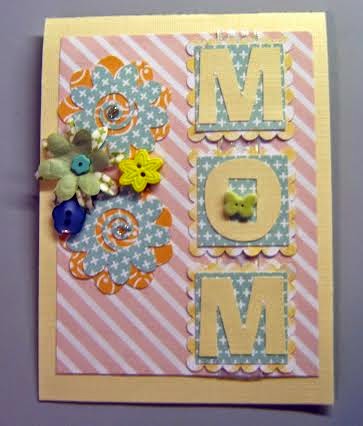
Tina created this lovely card for Mom using a file from  Flower Set One.  She says:  "I used one of the flowers from the set for the base of the flower cluster. MOM was cut with various Silhouette files. A cute little card that I think Mom would appreciate and takes no time at all to put together. For more details you have to head over to my blog":  Tina's Scrap Corner

PLEASE READ BEFORE YOU ENTER THE CHALLENGE:
Please make sure that you follow our very simple rules to enter this challenge.  
(1)You MUST use a SVG or similar electronic cutting file in your project.  CRICUT CARTRIDGE ONLY ENTRIES ARE NOT ELIGIBLE.  Please make sure that you mention somewhere in your post what part of your project was created with a cutting file.  Entries that do not fit this basic requirement will be deleted.
(2)  NO BACKLINKING.  This has always been our rule but we've noticed that it has not been followed lately. Going forward, projects posted before the start of this challenge will be deleted.


Challenge #32: Winner

We received 20 fabulous entries for this challenge and if I would have loaded the link up correctly, they would have shown up on the blog post!   Thanks to everyone who played along.  Please click on the link up link to see all the entries.  Click on the "HOME" button for details on the current Challenge, which will always be the top post.
Challenge #32 SPRING randomly drawn winner of the $5 SVG Gift Certificate

This winner is
#15 Beth F.

Congratulations!
Please email Cindy at creative@avci.net to claim your Gift Certificate.

Now on to the hardest part...making the "Creative Choice" selection....
The entry chosen is:
This stunning dimensional hot air balloon.  Love the lacy accents and the flowers used by
Please grab your badge above and display it proudly.


Monday, April 14, 2014

Challenge #32: Spring


SPRING

If we receive at least 15 entries, the prize for this challenge will be a $5 Gift Certificate for SVG files from the Creative Pointe's ON LINE STORE.
You'll find over 150 SVG files/sets available for all your paper crafting projects.
If we have less than 15 entries, the winner will receive this SVG set: LEAVES & BRANCH.  Winner will be randomly chosen from all submissions.

One extra special entry will receive the "Creative Choice" button.

Ready for some inspiration? Let's take a look at what the Design Team created using SVG diecuts.


Heather created a gorgeous vintage style Easter card using the Rolled Roses and Fancy Flourishes-One files.  Check out her blog for all the details:  My Artistic Adventures

Carolyn created a scrapbook layout using the Race Car with Numbers because she said spring brings in NASCAR and other auto racing.  She also says:  "And the Race Is On title is from the SilhouetteAmerica online store; the race track I created from a image located on the Internet; and the borders and flags from a SVG file (from where I can't remember right now).  I also created the border for the photo mat and placed the flag in the one corner.  I used Numbers 1 as the lead car, and 2 & 4 for my great-grandchildren's ages."  For more, check out Carolyn's blog:  Granny Ma's Creative Blog

Carmen created a lovely slider card that features the butterfly from the  Garden Friends 1 set.  See more at her blog:  Carmen's Creations

C
Ruth used the sign from the Flower Set One to create this gorgeous spring layout.  She says:  "This is my favorite time of the year! When the world comes alive with bulbs sending flowers up through the long frozen ground! Come celebrate spring with the Creative Cutting Challenge! However you like to celebrate spring, we'd love to see your creations! My layout celebrates those first spring bulbs blooming in my yard finally after our long, harsh winter. Cindy's Flower Set 1 flower sign really was a sign for spring! Spend a little time creating and get out and enjoy the Spring!"  More at Ruth's blog:  Paper and Musings

 Cindy created a gift bag perfect for all the Showers that happen during spring using the Watering Can, Leaves & Branch and Flower Set One files.  She says:  "Last spring I was planning a wedding shower for my sister.  This May it's a baby shower!  This gift bag would be perfect for either a bridal shower or a shower gift just for the Mom-To-Be...especially because all the gifts are usually  for baby!  If you'd like the 'Shower Heading' file, click over to my blog to grab it free!"  See more at Cindy's blog:  The Creative Pointe

Tina changed up a file to create this lovely layout.  She says:  "It’s Spring layout was created with The Creative Pointe’s Mom Flowers cut file, I eliminated the letters that spelled 'Mom' and cut out letters to spell out 'Spring' on the flowers. Spring is our favorite time of the year. I went with a grid style layout and the cut file is a real fun file to use this time of the year."  See more at Tina's blog:  Tina's Scrap Corner

PLEASE READ BEFORE YOU ENTER THE CHALLENGE:
Please make sure that you follow our very simple rules to enter this challenge.  
(1)You MUST use a SVG or similar electronic cutting file in your project.  CRICUT CARTRIDGE ONLY ENTRIES ARE NOT ELIGIBLE.  Please make sure that you mention somewhere in your post what part of your project was created with a cutting file.  Entries that do not fit this basic requirement will be deleted.
(2)  NO BACKLINKING.  This has always been our rule but we've noticed that it has not been followed lately. Going forward, backlinked projects will be deleted.


An InLinkz Link-up